
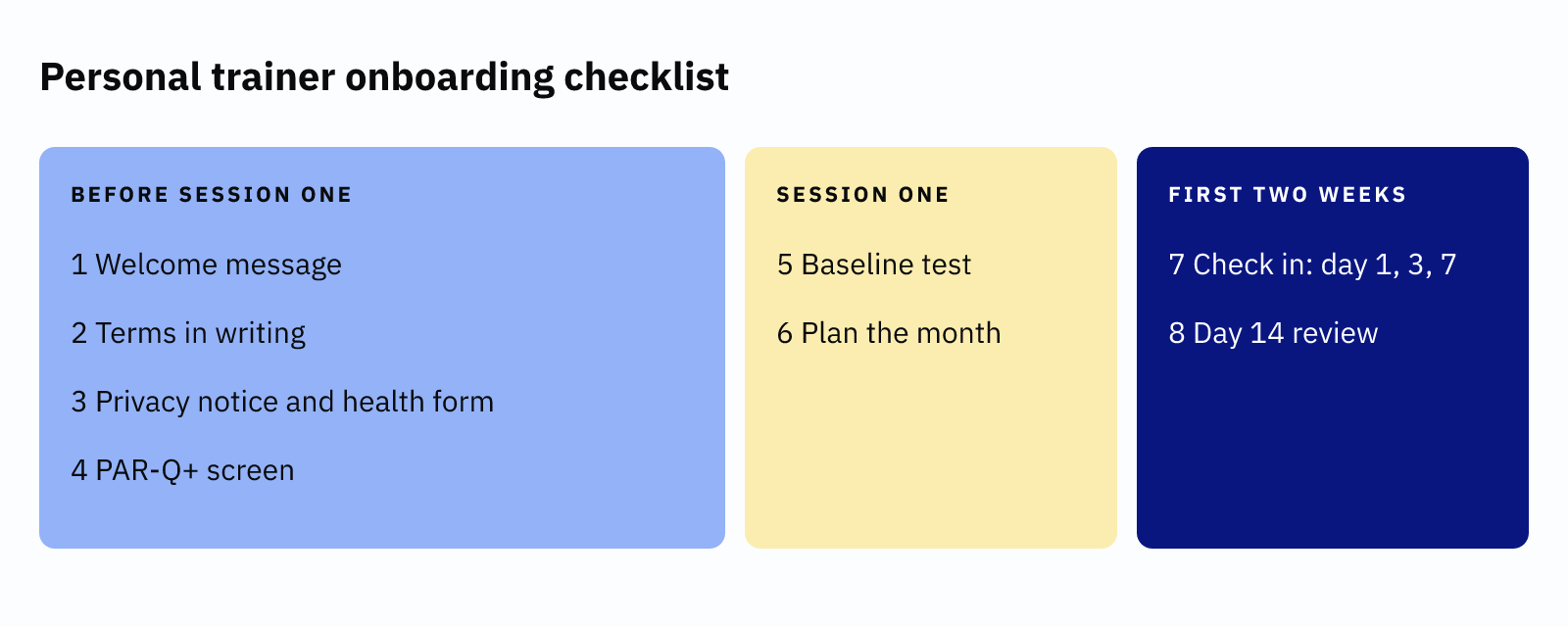
A personal trainer onboarding checklist is the fixed set of steps you run for every new client. It starts before session one and ends at day 14. The eight steps below cover the welcome, the terms, the health screen, the baseline and the first two weeks. One guide from Gymkee estimates about two to three hours of your time, spread across 14 days. Once you have done it twice, most of it is copy and paste.
Why a personal trainer onboarding checklist is worth the hours
Without a checklist, onboarding depends on your memory on a busy day. A client who never saw your cancellation terms is hard to hold to them later. A client whose health form is missing is a risk to both of you.
Gymkee's guide says strong onboarding is "the single biggest predictor of long-term client retention". It cites no study for that line, so treat it as opinion. The logic still holds, because a client with a clear plan has fewer reasons to drift. Our guide to PT client retention warning signs shows what drifting looks like.
Personal trainer onboarding checklist: before session one
The first four steps happen before the client trains. They protect you and set the tone.
- First, send a welcome message that says what happens next.
- Next, agree the terms in writing: price, payment and cancellation.
- Then, send your privacy notice and collect the health information.
- Finally, screen with the PAR-Q+ and act on the result.
1. Send a welcome message
PT Distinction published an onboarding guide on 13 October 2026. It advises a short document covering what is included, how to reach you and when check-ins happen. The same document covers payment, rescheduling and cancellation terms. A message like this does the job.
Hi [Name], I'm glad you're joining me. Here's what happens next. First, you'll get a short health form and my terms by email. Please complete both before [date]. Then we start on [date] at [time] at [place]. You can reach me on [email] and I reply within [X] working hours.
Replace each blank with your own policy. Only promise a reply time you can keep.
2. Agree the terms in writing
Put the rules in front of the client before they pay. A Sprintlaw guide from 12 October 2026 lists six documents for a PT onboarding pack. They are a registration form, a health questionnaire, a consent form, a liability waiver, terms and a privacy notice.
Keep cancellation charges fair. GOV.UK guidance says a business is generally only entitled to keep an amount that covers its actual losses. It adds that non-refundable deposits should only be a small percentage of the total price. Our guide to a PT cancellation policy has wording you can adapt.
A waiver cannot remove your duty of care. The Consumer Rights Act bars traders from excluding liability for death or injury caused by negligence. Use the waiver to record the risks you explained, and ask a qualified professional to check the wording.
3. Send a privacy notice before you collect health information
A health questionnaire is personal data. The ICO treats data concerning health as special category data. That is why the notice comes first. The ICO says you must give privacy information at the time you collect personal data. It must say why you use the data, how long you keep it and who sees it.
The ICO notes that this guidance is under review because of the Data (Use and Access) Act. Check the page again before you rely on it. Our GDPR guide for private-practice therapists covers the same health-data rules in more depth.
4. Screen with the PAR-Q+
The PAR-Q+ is a pre-participation screening form from the PAR-Q+ Collaboration. Page 1 has seven questions. If the client answers no to all seven, they sign the declaration and need no further pages. A yes to any question sends them to follow-up questions on pages 2 and 3. A yes there means they complete the ePARmed-X+ or see a qualified exercise professional. The site does not state licensing terms, so check them before you reuse the form.
The screen answers a different question from the waiver. Coachway's Markus Evers draws the line clearly. A PAR-Q asks "is it safe for this person to start at all?" A waiver asks whether the client accepts the risk. Do not start training until the screen is done.
Personal trainer onboarding checklist: session one
Session one sets the baseline. It also sets the habit of booking ahead.
- First, run a baseline test that matches the client's goal.
- Then, agree the first month and book the next sessions before they leave.
5. Run a baseline that matches the goal
PT Distinction advises baseline tests matched to the client's goal. For online clients, it suggests video movement reviews. A weight-loss client might get a body measurement and a walk test. A strength client might get a lift they can repeat in 14 days. Write the numbers down, because step 8 depends on them.
6. Agree the first month and book ahead
Say out loud what the next four weeks look like. Then book the next sessions before the client leaves. Booking ahead takes the "I'll let you know" out of week two. If you use a booking tool, send the confirmation straight away.
Personal trainer onboarding checklist: the first two weeks
The last two steps keep the client from drifting in the weeks when most doubts start.
- First, check in on day 1, day 3 and day 7.
- Then, review progress against the baseline on day 14.
7. Check in on day 1, 3 and 7
PT Distinction's rhythm is a welcome message on day 1 and a follow-up on day 3. A first weekly check-in follows on day 7. It suggests asking the same questions each week. Keep them short: how did sessions feel, what got in the way, and what do you need from me?
8. Review against the baseline on day 14
Repeat the baseline test from session one and compare. PT Distinction's checklist includes a day 14 progress review against the baseline. Show the client the two numbers side by side. Then agree the next four weeks.
Your 14-day timeline at a glance
| When | Step | Done when |
|---|---|---|
| Before session one | Welcome message, terms, privacy notice | Client has replied or signed |
| Before session one | PAR-Q+ screen | Result recorded, any referral made |
| Session one | Baseline and first-month plan | Numbers written down, next sessions booked |
| Day 1, 3 and 7 | Check-in messages | Client has answered each one |
| Day 14 | Baseline review | Client has seen the comparison |
What a booking tool covers in your personal trainer onboarding checklist
A booking tool does not run the health screen for you. It can handle the booking steps. Aasure gives you a branded booking page and an automatic confirmation. Reminder emails go before each session once you switch them on. Clients can cancel and reschedule themselves within the notice period you set. It also keeps client notes and visit history, so your baseline numbers sit next to the diary. It sends email only, not text or WhatsApp. If you are still choosing, our best personal trainer software guide compares the options.
Start small. This week, turn steps 1 to 4 into saved templates. Then run your next new client through all eight steps.
Switch reminders on once, then let them run.
In Aasure, clients book from your own page, then get a confirmation, plus reminder emails once you switch them on. Every feature is on every plan, with 0% commission and no setup fee. The first 200 sign-ups get a 60-day free trial. After that, every plan starts with 30 days. You need no card.
Sign up